Collector’s guide · Identification
How to identify a comic book by its cover
Found a comic in a long box and don’t know the title or issue? Start with the printed clues, then confirm the match against a reliable issue record.
1. Read the cover clues in order
Begin with the title logo, publisher, issue number, and any volume or season label. Then note the cover date, price, and barcode. Write these down before searching: a title can have several series with the same name, and numbering may restart when a new volume begins.
For example, record a comic as Series title · volume (if shown) · issue number · cover date · publisher. Treat the date as a clue rather than a guarantee of the exact on-sale date. Cover dates and release dates can differ.
A real cover: read four clues before choosing a match
This Library of Congress photograph of a Jackie Robinson comic gives us several independent clues. The numbered outlines show where to look. They identify visible cover details, rather than establishing the printing or condition of a book you own.
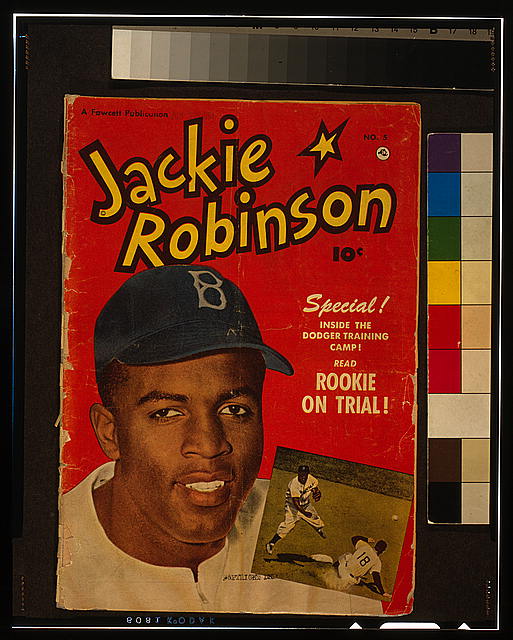
- Title: the large cover lettering reads Jackie Robinson. Use the title with the issue number when searching.
- Publisher clue: “A Fawcett Publication” appears near the upper left. Compare it with the publisher in a candidate record.
- Issue number: “No. 5” appears near the upper right. Keep the issue number separate from a series volume or a modern catalog identifier.
- Cover price: the printed price is 10 cents. It is a clue about this edition, not its current resale value.
The cover photo does not show the indicia or every interior page. A careful starter record would therefore say Jackie Robinson · No. 5 · Fawcett cover marking · printing unverified. Confirm the interior publication details before declaring an exact edition.
Why a familiar cover can still be a reprint
Marvel separately lists Fantastic Four (1961) #1 and a Fantastic Four Facsimile Edition (2025) #1 that reproduces it. Both are issue one; recognizable art is not proof of an original printing. Check the edition statement and interior publication details on the physical copy.
2. Check the indicia for the formal publication details
The indicia is the small-print publication statement, commonly printed inside the front or back cover. It may give the formal series title, publisher, issue or volume information, copyright, and mailing details. It is especially useful when the cover logo is stylized, abbreviated, or shared by multiple series.
Open the book gently and support the covers. If you are identifying a fragile comic, avoid forcing it flat. For additional bibliographic cross-checking, the Grand Comics Database catalogs series and issue records, including cover and story credits. Compare several fields; a similar cover image alone is not proof of a match.
3. Distinguish editions, variants, and reprints
One issue may have multiple covers, later printings, or editions aimed at different distribution channels. Look for a small printing statement, a barcode box, price differences, or an edition label. These marks can help narrow the result, but conventions vary by publisher and period. A barcode by itself does not establish rarity, value, or a first printing.
When two records seem plausible, compare the indicia, cover date, credits, and any printing note. Keep uncertainty in your catalog rather than guessing. If the exact printing matters for a sale or insurance record, confirm it with a specialist or a trusted publisher or database record.
4. Take a useful cover photo and verify the result
- Include all four edges of the cover and keep the camera parallel to the comic.
- Use even light; move the light source to reduce glossy-cover glare.
- Keep the issue number, title logo, and barcode sharp and unobstructed.
- Take a separate close-up of small print if you need to read it.
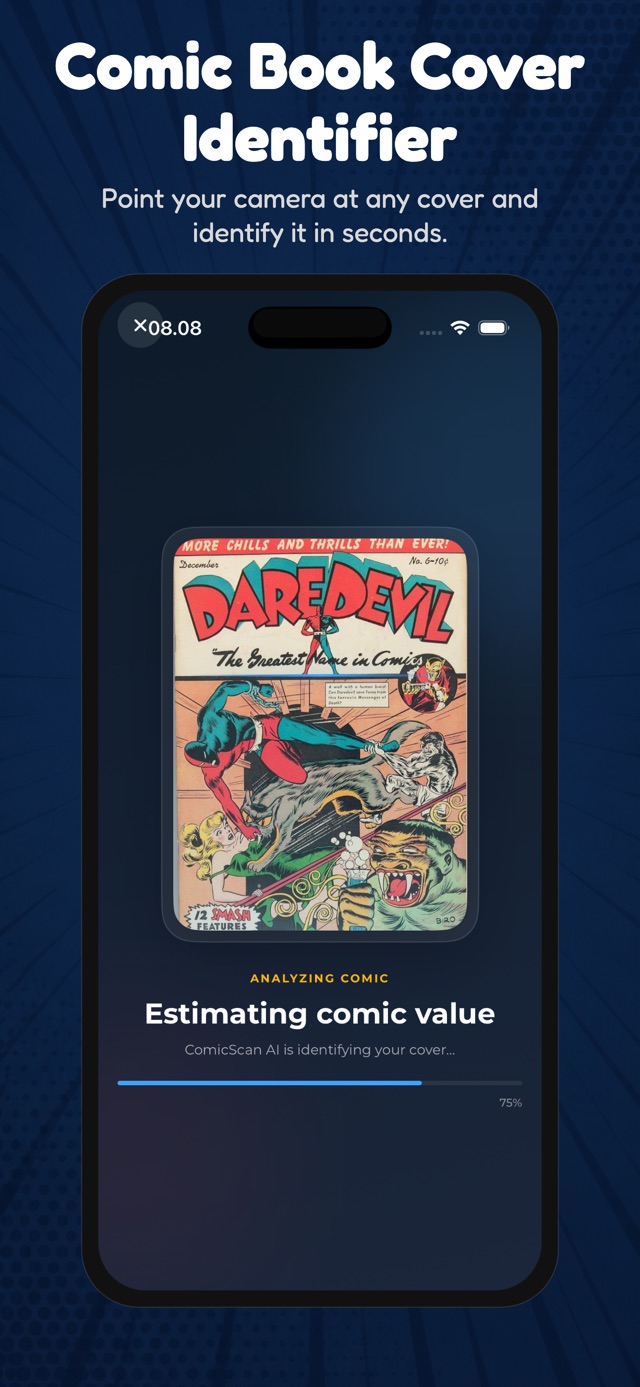
A cover-photo comic identifier such as ComicScan can provide a quick starting point when the title is unfamiliar. Treat an automated match as a lead: check its title, issue, publisher, and date against the physical copy before adding it to a catalog or making a buying decision.
What if the scan finds no convincing match?
Retake the photo without a bag, glare, or cropped edges if you can handle the book safely. Search the exact title plus the issue number, then compare the indicia and cover date with a catalog such as the Grand Comics Database. For a coverless book, start with the indicia and interior credits instead of the missing cover. If the data still conflicts, save the photo and the clues you know, and mark the issue as unverified. That is more useful than a confident but incorrect catalog entry.
Title, volume, issue number, publisher, cover date, edition or printing note, and a photo. Those details make it much easier to find the same comic again.
Related collector guides
Once you have identified an issue, read how to record comic condition and how to organize your collection.
Try ComicScan on iPhone →